AI bootcamps for one person or a whole company

Learn AI by building the thing you actually want.

Each bootcamp is a path you follow step by step: check off each step, copy the prompts, fill in your details once, and finish with something real.

A clay starting platform with paths branching out to a laptop, a phone, a padlock, a music keyboard and a small shop

The idea behind every track

Automate the work, keep your time.

Most people with a good idea also have a full-time job. Every track is built around the same rules, so the hours you put in go into the part only you can do.

Time is money

Automate the repeat work

If you do a task every day, it is a candidate for an agent or a script. You learn to spot those tasks and hand them off.

Build before you buy

Stop stacking subscriptions

Before paying for another tool, check whether you can build the small version yourself with AI. Often you can, and you own it.

Good prompts, good results

Detail in, quality out

Every track ships with long, fill-in-the-blank prompts. The more context the AI has, the better the result, and the fewer tokens and credits you waste.

Safe by default

Built so it is hard to break into

Private code on GitHub, no passwords or keys in your files, changes made in small reviewed steps, and a security check before anything goes live.

Try to break it

Test like an attacker

Before real users see it, you aim other AIs at your work with prompts written to find the bugs, the confusing parts and the holes.

Sell where you live

Community first

Friends, local businesses and referrals before ads. Early users get a lower price in exchange for honest feedback, so you learn fast and earn your first reviews.

Who it’s for

Every course, by who it’s for.

Your company or team

2 company tracks

The bootcamp for teams builds one role a week:

  1. UsersEveryday employees
  2. Power UsersAdvanced daily users
  3. SMEsSubject-matter experts: the people who know one part of the company cold
  4. AdminsReviews, approves and controls access
See the roles and the weeks

The tracks

For one person

Self-paced and interactive. You work through the steps on your own schedule, with the prompts, checklists and your notes in one page you keep coming back to.

01

Build and sell

Make something and sell it.

Solo track

Build and sell an app

$500

From an idea, a niche or a passion to a tested app or website that real people pay for: finding a market that isn't crowded, building with AI the safe way, breaking it before your users do, and getting it in front of people.

What you work through
  1. Start here
  2. Find the idea
  3. Test three ideas
  4. Set up from zero
  5. Spec and platform
  6. Secure GitHub setup
  7. Build with Claude
  8. Lock it down
  9. Test and break it
  10. Payments with Stripe
  11. Friends test it
  12. Ship on the web
  13. App Store and Google Play
  14. Run it
  15. Market it
  16. Automate the work
  17. Glossary
  18. What's next
Enroll
Solo track

Websites for local businesses

$500

Run a free scan of a local business's website, send a one-page report with three fixes, and offer a fixed-price rebuild. You learn the scan, the outreach, building the site with AI, hosting, and a clean handoff the owner can trust.

What you work through
  1. Start here
  2. Find businesses
  3. Scanning rules
  4. Scan: speed and phones
  5. Scan: security, links, access
  6. Scan: Google profile and SEO
  7. The one-page report
  8. Outreach
  9. The $500 offer
  10. Money, end to end
  11. Real content
  12. Design, build, quality bar
  13. Forms, access, privacy
  14. Hosting and domain
  15. Handoff and review
  16. Automate the scan
  17. Glossary
  18. What's next
Enroll
Solo track + mentorship

AI assistants for companies

$500

Build an assistant that answers staff questions from a company's own documents, with permissions and logs, then sell it, set it up and support it. Book live hours with me whenever you want a second set of eyes.

What you work through
  1. Start here
  2. Discovery interview
  3. Classify the data
  4. Pick the architecture
  5. Keys with spending caps
  6. Stand up the server
  7. Load the documents
  8. Departments, SSO, logs
  9. Prompt library
  10. Guardrails
  11. Red-team it
  12. Pilot and training
  13. Price it and sell it
  14. SOW, security, runbook
  15. Monthly maintenance
  16. Automate the repeats
  17. Glossary
  18. What's next
Enroll
02

Automate a business

Take the repeat work off someone's plate.

Solo track

Spreadsheet to command center

$500

Turn the spreadsheets a business runs on into forms people actually fill in, a real database, and one dashboard with the numbers that matter, connected through API keys to the systems the business already pays for.

What you work through
  1. Start here
  2. Sheets and decisions
  3. A simple data model
  4. Crew forms
  5. API keys, safely
  6. Sheets, Smartsheet, CRM
  7. QuickBooks and Stripe
  8. Rate limits, pagination
  9. Sync job and database
  10. Login and roles
  11. The command center
  12. Alerts, audit, backups
  13. Hosting
  14. Test data and privacy
  15. Red-team and handoff
  16. Automate the repeats
  17. Glossary
  18. What's next
Enroll
Solo track

AI that answers leads and email

$500

Answer every lead by text or email within minutes, in your own voice, and sort your inbox automatically. The AI drafts and you approve with one tap, so the reply is personal and a real person still sends it.

What you work through
  1. Start here
  2. AI drafts, you send
  3. Speed to lead
  4. Your voice profile
  5. Facts and reply lanes
  6. Set up safely
  7. The drafting brain
  8. Texting the legal way
  9. Missed calls, one-tap approval
  10. iMessage and blue bubbles
  11. Gmail triage and drafts
  12. Outlook with Microsoft Graph
  13. Log it all to a CRM sheet
  14. Opt-outs and quiet hours
  15. Try to break it
  16. Automate the repeats
  17. Glossary
  18. What's next
Enroll
Solo track

Your AI second brain

$500

One folder of plain notes an AI can read: client conversations, decisions and ideas, captured in seconds and easy to find months later. Work and personal kept apart, and the files stay yours.

What you work through
  1. Start here
  2. Own your files
  3. Obsidian, two vaults
  4. Folders and links
  5. Templates, daily note
  6. Voice capture
  7. Email and web capture
  8. People notes, privacy
  9. Give an AI access
  10. The rules file
  11. AI ingest
  12. Decision log
  13. Weekly review, ask
  14. Backups and sync
  15. Security, break it
  16. Automation
  17. Glossary
  18. What's next
Enroll
03

Create and teach

Run a channel, or teach what you know.

Solo track

YouTube Shorts on autopilot

$500

Two strands. Automated: agents find licensed footage every day, cut it, assemble finished Shorts on your own computer and upload them on a schedule. AI-generated: videos made with tools like Higgsfield, with prompts that stop you paying for shots you don't use.

What you work through
  1. Start here
  2. Niche and strand
  3. The monetization rules
  4. Channel and progress log
  5. Licensed sources (A)
  6. Sourcing agent (A)
  7. Clipping agent (A)
  8. Assembly agent (A)
  9. Higgsfield prompts (B)
  10. Shots, credits, disclosure (B)
  11. Hooks and first seconds
  12. Titles, descriptions, hashtags
  13. Music licensing
  14. Auto-upload with the API
  15. One command, then break it
  16. Weekly analytics review
  17. Glossary
  18. What's next
Enroll
Solo track

Start an AI music channel

$500

Original AI music with a recurring character, long mixes and Shorts, assembled and uploaded by a script, plus an optional 24/7 live stream. Rights come first: which music tools let you use what you make, and the YouTube rules AI channels run into.

What you work through
  1. Start here
  2. Niche and identity
  3. Music rights first
  4. Hard rules
  5. YouTube's rules
  6. Make the music
  7. The mascot
  8. The loop
  9. Mixes vs Shorts
  10. Tracklists, titles, thumbnails
  11. Build it with ffmpeg
  12. Upload and schedule
  13. Read the numbers
  14. Streaming services
  15. Automate the daily video
  16. 24/7 live stream
  17. Glossary
  18. What's next
Enroll
Solo track

Build your own bootcamp

$500

Turn something you know into a paid program. Find the skill people already ask you about, design lessons that each end in something the student made, build the interactive page with AI, take payments and sell it to the people around you.

What you work through
  1. Start here
  2. What people ask you
  3. Prove demand first
  4. Promise and "not for"
  5. Lessons that end in something
  6. Draft materials with AI
  7. Fact-check with a second AI
  8. Build the course page
  9. Put it online
  10. Gate the paid pages
  11. Price and payments
  12. Terms and referrals
  13. Claims, testimonials, the law
  14. Launch with a personal post
  15. Deliver and improve
  16. Automate the repeat work
  17. Glossary
  18. What's next
Enroll
04

Private, secure, experimental

Keep data private, test for holes, try paper trading.

Solo track

Private AI on your own computer

$500

For one-person practices that handle sensitive files: therapists, bookkeepers, consultants and anyone who can't paste client data into a cloud chatbot. Run a model on your own machine, lock it down, and use it on your documents.

What you work through
  1. Start here
  2. Is local right for you?
  3. Map your data
  4. Hardware by budget
  5. Prepare the computer
  6. Install the model runner
  7. Choose a model
  8. Seal it off
  9. A chat window: Open WebUI
  10. Draft notes and summaries
  11. Chat with your documents
  12. Local transcription
  13. Test it, then try to break it
  14. HIPAA: what local solves
  15. Backups and updates
  16. Automate the repeat work
  17. Glossary
  18. What's next
Enroll
Solo track

Red-team your app with AI

$500

Attack your own app before someone else does. Several AIs act as attackers and reviewers; you reproduce each finding, fix it, write a test that proves the fix, and attack again. The most in-depth track here.

What you work through
  1. Start here
  2. Permission and scope
  3. A safe test lab
  4. Inventory your app
  5. Threat model and test plan
  6. The multi-AI attack
  7. Secrets and git history
  8. Package and code scans
  9. Dynamic scan with ZAP
  10. Logins and sessions
  11. Access control and IDOR
  12. Injection, XSS, uploads
  13. Headers, TLS and leaks
  14. Payment logic
  15. The mobile app
  16. AI features
  17. Fix it and prove it
  18. Logs, alerts, incidents
  19. Launch and disclosure
  20. Automate the re-test
  21. Glossary
  22. What's next
Enroll
Experimental

Build a paper-trading bot

$250

An engineering track, not investment advice. Build the data feed, risk limits, kill switch and logs, test honestly against simply holding an index fund, and trade with paper money. I haven't made money trading with my own bot, which is why this one is experimental and priced lower.

What you work through
  1. Start here
  2. A safe workshop
  3. Alpaca paper account
  4. The five-stage design
  5. Two safety switches
  6. Market data you trust
  7. A plumbing-only signal
  8. Risk gate and kill switch
  9. Orders without duplicates
  10. Logs and daily report
  11. Honest backtesting
  12. Buy-and-hold benchmark
  13. AI research assistant
  14. Red-team the bot
  15. Schedules and alerts
  16. Weeks of paper trading
  17. Glossary
  18. What's next
Enroll

For companies

Run inside your company with live sessions, for up to 6 people, under rules your leadership approves.

Company track

AI bootcamp for teams

$5,000

Four weeks plus Week 0. Your team uses AI on its own work, builds automations, and shows your leadership what it built, what it costs and the time it saves, measured.

See the full program
Company track

Private AI for your company

$5,000

For practices and companies that want AI but can't send their data to a cloud tool: medical and dental offices, law and accounting firms, anyone with client files. A local model on your own hardware, sandboxed, with written rules for what goes in.

What you work through
  1. Inventory: what data you hold and who may see it
  2. Decide what runs locally and what may use the cloud
  3. Hardware and setup on your own machines
  4. Sandboxing, accounts and logging
  5. Your documents, searchable by a local AI
  6. A test set your staff checks answers against
  7. Written rules, an owner, a review on the calendar
Ask about it
Andrew Lombardi

Who teaches it

Andrew Lombardi, Director of AI at a Texas metal-building manufacturer.

The tracks come from things I build and run myself.

At work

  • A company-wide command center with a built-in AI assistant
  • A live scope manager for the sales team
  • The same framework at a second company
  • Now prototyping: a headset app that checks steel against the 3D model

On my own

  • A daily AI music channel
  • A car Shorts channel, 71,000+ subscribers
  • A phone app, tested with friends first
  • Waybill, an app that tracks a fleet’s vehicles and cargo (in beta)
  • A 12-track AI bootcamp: this one

Where I work

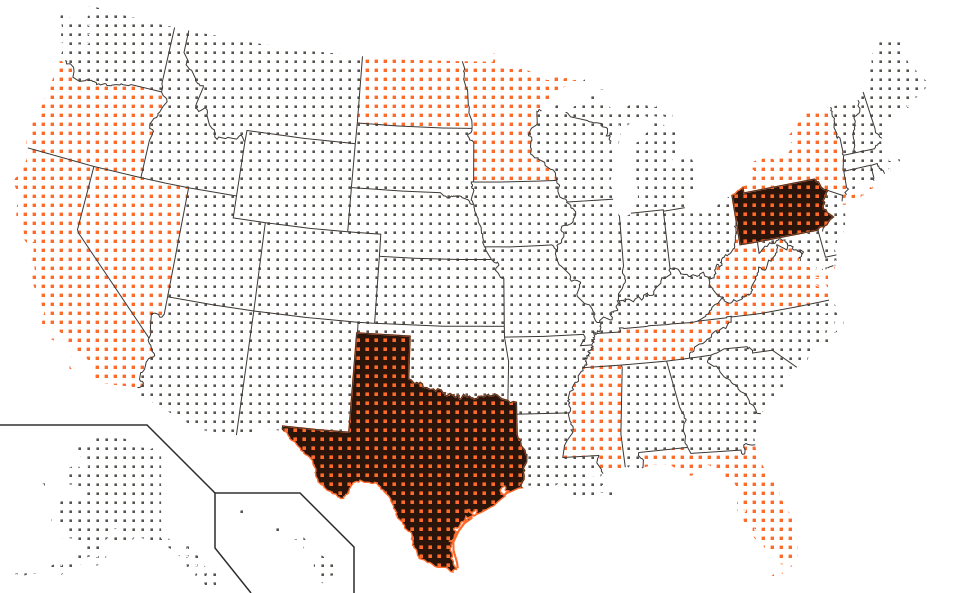
I work with people all over the world, a lot of them in Texas and Pennsylvania.

7 countries · 13 US states

Outside the US: Australia, Canada, Germany, Mexico, Sweden and Thailand.
In the US, 13 states: California, Florida, Minnesota, Mississippi, Nevada, New York, North Dakota, Oregon, Pennsylvania, Tennessee, Texas, Virginia and West Virginia.
“This is going to be a pivot point in the company’s history.”
Ted Bush, CEO, after the leadership dashboard demo
“In 3 months you’ve blown past what they did … in 2 years.”
Brian Jones, COO
“We’re running this like a dealership. All of our competitors, Ford, Subaru, Toyota, and Andrew, you’re making us Ferrari.”
David Scherzer, CFO

Pricing

Simple prices.

One person

$500per track

Any solo track. The experimental trading-bot track is $250.

  • The full interactive track: steps, checklists, prompts and your notes
  • Your progress saves as you go
  • At least 12 months of access, with updates

Company

$5,000per company

The team bootcamp or private AI for your company. Up to 6 people in the live sessions.

  • Live hour every week
  • Run on your accounts and your data
  • 30-day check-in after it ends
Company details

Extra help

$200per hour

Calls, screen shares and reviews of what you built. Sold in 5-hour blocks ($1,000), used within 90 days.

  • Help with the stuck part
  • A second set of eyes before you launch
Buy hours

Referrals

$100back per person

Refer someone who buys a solo track and I pay you $100 ($50 for the trading-bot track), 90 days after their payment. Refer a company that enrolls and it is $500. Already bought a track? Then instead I pay you back for it and open every track for you.

  • Tell them to type your email in "Referred by" when they pay
  • Nobody referred you? Type "none" there

How the price compares

Published prices for other kinds of programs, checked November 10, 2026. They're different products from mine: each runs on its own fixed schedule, and most add live sessions or a cohort, so treat them as context, not a like-for-like match.

Mine: each track is self-paced and takes you through one real project, for $500 ($250 for the experimental trading-bot track).

Prices in US dollars. All sales are final; see the terms of sale. Your AI subscriptions and any app store, hosting, texting or video tool fees are separate and paid by you.

Questions

What people ask first

I have never done any of this. Can I still do it?

Yes. Every solo track starts at zero: which AI subscription to buy, which accounts to make, and what each one is for. Each step is something you click through and check off.

What do I need to buy?

A computer and a paid plan for an AI assistant such as Claude or ChatGPT. Some tracks add their own costs, for example the Apple Developer Program if you publish to the App Store, or credits on an AI video tool. Each track lists those up front so you know before you start.

How do I get into my track after I pay?

I add the email you paid with to your track and email you the link. I do this by hand, so it isn't instant. When you open the link, type that email and you'll get a one-time login code from Cloudflare, the service that protects the course pages. It comes from noreply@notify.cloudflare.com, so check your spam folder if it doesn't show up.

Can I share my access?

No. Each track is for the person who bought it. See the terms of sale. If a friend wants in, send them here: when they buy, you get $100.

Will I make money?

I can't promise that, and nobody honest can. The tracks teach the method I use and the mistakes to avoid. What you earn depends on the niche you pick, the work you put in and your market.

What does "experimental" mean?

It's a track I'm still learning myself. The trading-bot track teaches the engineering: building a bot, testing it honestly and limiting its risk with paper money. It isn't investment advice and it doesn't come with a strategy that makes money, so it's $250 instead of $500.

Can I get a refund?

Once your access is turned on, no: you have the full track, so the sale is final, wherever you live. If you paid and I haven't turned on your access yet, email me and I'll refund you in full. See the terms of sale.

How do referrals work?

When someone you referred buys a solo track, I pay you $100 ($50 for the trading-bot track) 90 days after their payment, as long as it has not been refunded or disputed. For a company that enrolls in a company program, it is $500, or, if you bought a track, I pay you back for your track instead and open every track for you. Ask them to type your email in the "Referred by" box when they pay. If nobody referred you, type "none" there. The full rules are in the terms of sale.

Can I get help along the way?

Yes. Extra help is $200 an hour, in 5-hour blocks, for calls, screen shares and reviews.
Not sure which path?

Tell me what you want to build.

Send one or two sentences: what you do now, and what you want AI to do for you. I'll tell you which track fits, or that none does yet.

Run by Andrew Lombardi.